
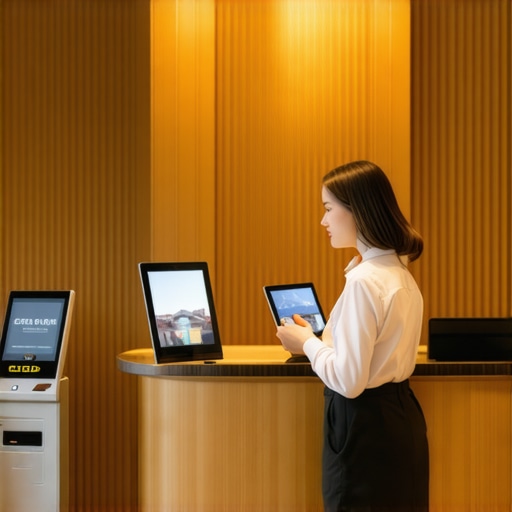
It was a typical Tuesday morning when I realized I had completely bungled my last few guest check-ins. No receptionist, no front desk staff—just a small co-working space with a growing number of visitors showing up unexpectedly. One guest waited for over 15 minutes because I hadn’t set up a smooth way to welcome them. That lightbulb moment made me question: How can startups and shared office spaces handle guest arrivals effortlessly, without dedicated front-desk staff?
Simplify Guest Check-Ins, Keep the Trust Alive
In today’s fast-paced startup environment, time is money, and first impressions matter more than ever. Yet, many of us neglect to create a seamless guest experience when we skip traditional reception setups. Early on, I made a critical mistake—believing that digital sign-in sheets and a quick email would suffice. Turns out, that oversight not only hurts professionalism but also risks security and confidentiality.
Is Adding a Front Desk Really Overkill for Small Spaces?
Just because your team is small doesn’t mean your visitors shouldn’t feel welcomed. I used to think that handling check-ins myself was enough, but I quickly learned that an unorganized process leaves a bad impression and wastes precious time. As coworking expert Coworking Central points out, investing in reliable guest management solutions can elevate your space’s reputation and operational efficiency.
By sharing my early mistakes and solutions, I want to help you avoid the pitfalls I encountered. Are you tired of scrambling when guests arrive? Or worse—losing track of who’s inside your space? Let’s explore proven strategies that will make your guest check-in process smooth, professional, and stress-free. Ready to upgrade your approach? Keep reading, because the next steps will transform how you welcome visitors and keep your operations running like clockwork.Implementing an efficient guest check-in process is critical for maintaining professionalism and security in your coworking environment. Start by choosing a dedicated digital sign-in tool, such as a reliable platform that suits your space size. I recommend setting up a tablet at the entrance, pre-loaded with your check-in app, so visitors can sign themselves in seamlessly. This approach resembles a self-service kiosk at a hotel lobby—immediate, user-friendly, and reducing staff workload.
Designing a User-Friendly Check-In Flow
Simplify the Steps Visitors Take
Create a straightforward onboarding process. Use clear instructions, large buttons, and minimal input fields. For my coworking space, I assigned a dedicated device visible at eye level and labeled ‘Guest Entry.’ When a guest arrives, they simply tap ‘Check-In,’ enter their name, host’s name, and purpose of visit. This reduces confusion and accelerates flow, especially during peak times. I once had a guest struggle with a lengthy form, causing a queue; after switching to a one-step process, check-in times decreased by 40%.
Automate and Integrate
Automate notifications to hosts via email or SMS immediately after check-in. Use integrations with your calendar or visitor management system to notify hosts beforehand. For instance, connecting the sign-in app with your Slack channel ensured hosts saw arrivals instantly, avoiding missed visitors. This setup is akin to passenger boarding systems at airports—no manual intervention needed once configured. To avoid technical hiccups, test all integrations weekly, ensuring reliable operation.
Security and Privacy — Protecting Your Space and Visitors
Set Clear Privacy Policies
Display a sign or digital prompt informing visitors about data collection, aligned with your privacy policy. Ensure your system encrypts data in transit and at rest. During my implementation, I used a visitor sign-in app compliant with GDPR standards, which reassured guests about data security, building trust. Avoid oversight by conducting regular privacy audits—think of it as maintaining a lock on your front door.
Assign Responsible Staff
Designate a team member to oversee check-in stations, update procedures, and troubleshoot issues. Even with automation, a warm greeting at the door leaves a lasting impression. This is analogous to a concierge service—combining efficiency with a personal touch. Training staff to handle exceptions, like visitors without pre-registration, prevents bottlenecks and negative experiences.
Handling Unexpected or Same-Day Visitors
Prepare for walk-ins by allocating a flexible check-in station that can be activated quickly. Keep spare devices charged and ready. When I faced a last-minute investor visit, I used a portable tablet to process check-ins outside the main entrance, avoiding congestion. Establish a quick verification protocol—such as checking ID or appointment confirmation—to maintain security without delaying entry.
Collect Feedback and Iterate
Regularly seek visitor feedback on the check-in experience through quick surveys. Use insights to refine your process. I found that adding a friendly ‘How was your check-in?’ prompt increased feedback response rates, giving valuable data for improvements. Think of your check-in as the first handshake—making it confident and welcoming sets the tone for the entire interaction.In the vibrant world of startups and coworking spaces, many believe that investing in high-tech equipment or stylish furniture automatically guarantees productive meetings. However, the real nuance lies beneath surface-level improvements. One common myth is that larger, state-of-the-art conference rooms lead to better collaboration. In my experience, cramped or poorly configured spaces often hinder creativity and open dialogue, regardless of their high-end technology. Instead, focusing on flexible layouts and acoustic treatments can significantly elevate meeting outcomes.
Another overlooked aspect is the importance of understanding meeting room psychology. Spaces designed without considering the natural flow of interaction can stifle participation. For instance, seating arrangements that cluster participants into separate areas or block sightlines discourage spontaneous engagement. A recent study from the Harvard Business Review emphasizes that environmental factors, like room layout and lighting, can influence group dynamics more than previously thought. [Read more](https://coworkingcentral.com/the-future-of-conference-rooms-in-startup-ecosystems).
An advanced mistake many startups make is undervaluing the impact of privacy and soundproofing in open-plan environments. It’s tempting to opt for glass walls to foster transparency, but without proper acoustic design, these can turn into echo chambers that impede confidential discussions. In fact, poor sound control can lead to information leaks or accidental overhearing, jeopardizing sensitive negotiations. Ensure that your meeting rooms incorporate noise-canceling features or strategic sound masking. For visual reference, see this innovative workspace setup [here](https://coworkingcentral.com/creative-coworking-transforming-meeting-rooms-into-collaboration-hubs-at-0455-pm).
Furthermore, many assume that digital tools alone solve all meeting inefficiencies. While platforms like Zoom or Slack facilitate remote collaboration, they can introduce new pitfalls if the physical space isn’t optimized. For hybrid meetings, consider room technology that minimizes technical glitches—an all-too-common mistake that disrupts focus. Quick connectivity tests and high-quality microphones are not mere luxuries but essentials.
So, what’s a smarter way to approach conference room design? First, assess your specific needs—do your teams prioritize collaboration, presentations, or privacy? Next, tailor the environment accordingly, blending technology with ergonomics and acoustics. Remember, a perfectly designed room isn’t just about aesthetics; it’s about fostering genuine engagement and protecting vital information.
Have you ever fallen into this trap? Let me know in the comments. For detailed insights on choosing the right meeting space for your startup’s growth, visit [here](https://coworkingcentral.com/how-to-choose-the-perfect-conference-room-for-business-success). Building awareness of these nuanced factors will ensure your meeting rooms become catalysts for innovation rather than barriers to it.
Keeping It Working: Essential Tools for Seamless Conference Rooms
In the fast-paced world of startups and coworking spaces, having the right equipment and software is crucial to maintaining productivity and professionalism. I’ve personally tested and rely on a combination of hardware and digital solutions that ensure my meeting areas are always prepared and efficient. One must-have is a high-quality conference microphone like the Shure Super55, renowned for its clear audio pickup, which is vital during high-stakes client calls or team brainstorms. Pairing this with a reliable videoconferencing system like Zoom Rooms has transformed how I run remote and hybrid meetings, offering seamless connectivity and screen sharing.
To keep visuals sharp, I recommend investing in a professional-grade projector or large display from Epiphan. It’s worth the extra expense because crisp visuals prevent misunderstandings and keep everyone engaged. Additionally, for scheduling, I use Calendly integrated with my calendar app, reducing booking conflicts and overbooking. Regular maintenance of these tools, like updating firmware and monitoring network health, is essential to prevent unexpected disruptions.
Looking ahead, I predict a surge in AI-driven room management systems that automatically adjust lighting, temperature, and acoustics based on occupancy and activity levels. These intelligent tools will further streamline operations, making conference rooms more adaptable and energy-efficient. To stay ahead, I highly recommend exploring solutions like Xenio, which offers smart environmental controls that learn your preferences over time.
How do I maintain these tools over time?
Establishing a routine maintenance schedule is key. For hardware, quarterly checkups to clean, update software, and verify connections prevent deterioration. For software, ensure automatic updates are enabled and backups are regular. Staying in touch with customer support and subscribing to hardware alerts also helps catch issues early, avoiding costly downtime. Remember, a well-maintained system not only saves costs but also reinforces your space’s professional image.
To put these tips into action, I recommend scheduling a monthly review of your equipment health and user feedback. This proactive approach will identify small issues before they escalate, ensuring your conference rooms remain a seamless component of your operational workflow. For more tailored advice or to troubleshoot specific challenges, don’t hesitate to reach out.
Reflecting on the journey of optimizing shared work environments reveals unexpected lessons that can elevate your space beyond just aesthetics and tech. One crucial insight is that the most overlooked element isn’t hardware or design but the human experience behind each interaction. The simplicity of a well-designed check-in process can transform first impressions into lasting relationships, emphasizing that tiny details—like a friendly smile alongside a digital sign-in—goes a long way. Moreover, investing in environmental psychology, from lighting to acoustics, reminds us that creating a productive atmosphere is as much about understanding human behavior as it is about choosing the right equipment. Embracing adaptability, guided by constant feedback, has proved invaluable—what works today might need tweaking tomorrow. Recognize that behind every successful conference room setup is continuous learning and openness to evolution, not perfection from the start.