
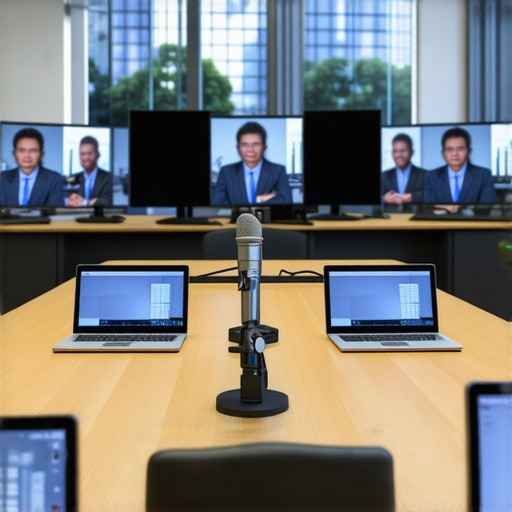
I remember the exact moment when I realized I was completely unprepared for a hybrid board meeting. The room was filled with eager participants, both in-person and dialing in from afar, yet the technology we relied on was a patchwork of older equipment and ad-hoc solutions. The audio was echoing, the screen kept freezing, and I found myself desperately scrambling to fix issues mid-meeting. It was a lightbulb moment that there had to be a better way.
Why Hybrid Meeting Tech Can Make or Break Your Leadership
In today’s fast-paced world, seamless communication isn’t just a luxury—it’s a necessity. I’ve come to understand that investing in the right technology isn’t just about convenience; it’s about credibility and efficiency. A bad tech setup can derail agendas, frustrate participants, and even harm your reputation as a leader. The truth is, the right tools turn a potentially chaotic hybrid gathering into a productive and engaging experience. According to a study published by Wainhouse Research, organizations that leverage advanced meeting room technology report a 40% increase in meeting productivity.
Have you ever faced a tech fail during a critical meeting?
Is Hybrid-Ready Tech Really Worth the Investment?
Early in my journey, I made the mistake of thinking that a few webcams and speakers would suffice. Boy, was I wrong. It’s easy to underestimate how much dedicated equipment can elevate your meetings. This oversight cost me time, credibility, and a few stressful moments. From my experience, upgrading to purpose-built hybrid meeting tech transformed our meetings—and your startup or company doesn’t have to wait as long as I did. Want to avoid the pitfalls I encountered?
Now, let’s explore the essential tech components that will ensure your hybrid meetings are smooth sailing from start to finish. Whether you’re leading a startup, managing a board, or hosting client presentations, the right setup makes all the difference. Ready to dive into the practical solutions?Equip Your Space Like a Pro: Start by assessing your existing room setup and identify gaps. Invest in a high-quality camera that captures clear video even in low light, a microphone that picks up voices from all corners, and a reliable speaker system to prevent audio echoing. For a startup office, I once replaced basic webcams with a PTZ camera and professional-grade mics, which instantly improved remote participant engagement.
Choose the Right Hardware for Your Needs
Prioritize Camera Quality
Use cameras with at least 4K resolution for sharp visuals; hybrid meetings demand clarity so remote attendees feel present. Consider a camera with pan, tilt, and zoom features to easily focus on active speakers, especially during brainstorming sessions.
Select Audio Equipment That Covers Your Space
Invest in omnidirectional microphones or a ceiling mic array—these effectively pick up voices across the room without creating echoes. Combine with sound-absorbing panels or soft furnishings to mitigate audio bouncing. At my last office, replacing a single microphone with a room-wide mic array eliminated echo issues and increased clarity.
Implement a User-Friendly Control System
Use a centralized, touch-screen panel or a simple app to manage all devices seamlessly. During a messy onboarding call, I had to juggle multiple remotes; switching to a single control panel cut the setup time by half, making meetings flow smoothly.
Test Before the Big Meeting
Schedule dry runs to check camera angles, audio clarity, and connectivity. I once faced a freezing screen right at the start of a crucial pitch; a pre-test would have caught Wi-Fi issues. Ensure all firmware and software are up to date, and test with actual participants if possible.
Optimize Your Room Layout for Tech
Position the camera at eye level, ideally mounted on a tripod or wall. Arrange chairs so speakers face the camera directly, avoiding glare and obstructions. For a small conference room, I learned that seating in a semi-circle improved both visual engagement and audio pickup.
Train Your Team on Equipment Use
Conduct quick tutorials to familiarize everyone with the tech. A quick guide on muting/unmuting, camera controls, and troubleshooting can save valuable minutes during live calls. During my last team meeting, sharing a simple cheat sheet prevented multiple Many assume that simply renting a coworking space guarantees productivity and professional image, but the reality is far more nuanced. One common misconception is that all shared environments foster collaboration equally; however, a significant overlook is the impact of spatial design on workflow efficiency. For example, poorly arranged furniture or noisy communal areas can inadvertently hinder concentration, especially in startup settings where focus is crucial. According to a Harvard Business Review study, workspace ergonomics and layout can significantly influence employee output and morale. Moreover, the industry often emphasizes cutting-edge amenities over strategic space planning, which can be a costly mistake. Advanced entrepreneurs understand that the true productivity boost comes from thoughtful room configurations and intentional acoustics, not just state-of-the-art coffee machines or lounge zones. Have you ever fallen into this trap? Let me know in the comments.
Are We Overestimating the Power of Fancy Conference Rooms?
Many believe that high-tech, stylish meeting rooms automatically translate to successful meetings. While aesthetics and technology are important, the real nuance lies in usability and accessibility. Overly complex control systems or excessive technological features can create barriers, consuming precious meeting time for troubleshooting rather than strategizing. A report by McKinsey highlights that the most effective meeting rooms are intuitive and flexible, accommodating both formal presentations and casual brainstorming sessions with ease. For startups aiming for agility, investing in versatile furniture and simple tech solutions often yields better results than flashy setups. It’s essential to evaluate whether your workspace encourages genuine interaction or merely impresses visitors. Want to optimize your space for real productivity? Check out how top coworking environments are redesigning their layouts to foster innovation and focus. Explore more about transforming your meeting rooms into collaboration hubs through our detailed guide.
Remember, the devil is in the details. Small spatial adjustments and mindful tech choices can make a world of difference. Don’t just focus on the latest features—consider how your room’s design influences daily workflow and team cohesion. Want personalized recommendations? Reach out via our contact page or learn about the future of conference rooms in startup ecosystems. Strategic space planning is an ongoing process—keep refining to stay ahead. After all, your workspace is an extension of your company’s culture and a pivotal element for long-term success.Maintaining a productive and efficient coworking environment requires more than just initial setup; it demands continuous care, the right tools, and strategic planning. Personally, I rely on a combination of hardware and software solutions to ensure our spaces remain functional and inviting. One tool I highly recommend is Skedda, a booking management platform that simplifies scheduling and prevents double bookings. I use it daily to coordinate meeting rooms, and its visual calendar and automated reminders significantly reduce conflicts. For seamless communication, Slack remains indispensable; I’ve integrated channels for maintenance alerts, equipment requests, and space updates, fostering proactive management. For physical maintenance, I schedule regular inspections using a checklist app like Evernote, which allows my team to document issues, attach photos, and track repairs over time. This systematic approach minimizes downtime and extends equipment lifespan.
In terms of long-term results, consistent maintenance built around these tools helps retain tenants and attracts new members by demonstrating professionalism and responsiveness. Scaling your coworking operation? Automating routine tasks becomes even more critical. Cloud-based monitoring solutions such as those discussed here can alert you to HVAC issues, connectivity problems, or security breaches before they escalate. The future predicts an even tighter integration of IoT devices—think smart thermostats, occupancy sensors, and predictive maintenance software—as detailed by industry leaders like Cisco.
How do I maintain coworking spaces over time? Regularly scheduled inspections paired with feedback loops from members help identify emerging issues early. Create a maintenance calendar that includes weekly cleanliness checks, monthly equipment calibration, and quarterly deep cleans. Incorporate digital tools like room booking management software to keep operational data organized and accessible. Training your team on these systems ensures everyone is aligned and proactive.
Don’t underestimate the value of building a culture that encourages reporting issues promptly. For example, setting up a dedicated Slack channel for maintenance requests can streamline communication and expedite resolutions. Keep a detailed asset registry—know what equipment needs replacement and when. Transitioning from reactive to proactive maintenance isn’t a one-time effort; it’s an ongoing process that saves costs and enhances member satisfaction.
Take an advanced step today by integrating IoT sensors for real-time space analytics. This data-driven approach, supported by companies like Cisco, allows you to predict issues before they disrupt operations, creating a truly resilient coworking environment. Visit our contact page to learn how to implement these technologies tailored to your space. Remember, the key to long-term success lies in diligent upkeep and leveraging the right tools—your members will thank you for it.
The Hardest Lesson I Learned About coworking,conference room,startup,meeting rooms
One of the toughest insights was realizing that technology alone can’t compensate for poor room layout and untrained staff. I once invested heavily in high-end cameras and microphones, only to discover that awkward seating arrangements and unclear instructions turned our meetings into frustrating experiences. It taught me that understanding human behavior and workflow is just as vital as the gear you choose.
3 Myths About coworking,conference room,startup,meeting rooms That Held Me Back
I used to believe that bigger, more expensive setup automatically meant better meetings. Turns out, overly fancy gear can intimidate or confuse users. Simplicity and intuitiveness often outperform high-tech configurations. Also, I thought automation could solve all scheduling issues but learned that staff training and clear policies are irreplaceable.
What Experts Won’t Tell You About coworking,conference room,startup,meeting rooms
Many consultants focus on gadgets but overlook emotional comfort and accessibility. Creating a space that fosters trust involves more than tech; it requires thoughtful design and consistent upkeep. For instance, integrating proven tools like workspace management software can be game-changing for long-term efficiency.
My Essential Toolkit for coworking,conference room,startup,meeting rooms
I rely on a mix of hardware and digital tools: professionals-grade cameras and mics ensure clarity, while platforms like room booking software helps organize schedules. Additionally, regular maintenance schedules with apps like Evernote help monitor assets and prevent downtime, keeping the space always ready for the next big idea.
Where to Go from Here
If you’re serious about transforming your hybrid meetings, start small: audit your current setup, gather feedback from users, and experiment with simple upgrades. Remember, tech is a support tool; the real magic happens when you combine it with thoughtful design and team training. For more inspiration, explore how leading coworking hubs are redesigning their meeting spaces to ignite innovation here.
Let’s Build Something Better Together
Every space has potential, and your commitment to continuous improvement will set your startup apart. Keep listening to your team, stay curious about new solutions, and never settle for the status quo. Your next great meeting might just be one smart upgrade away.
What’s been your biggest challenge in creating an effective hybrid meeting environment? Share your experience below—I love hearing real stories from fellow innovators!