
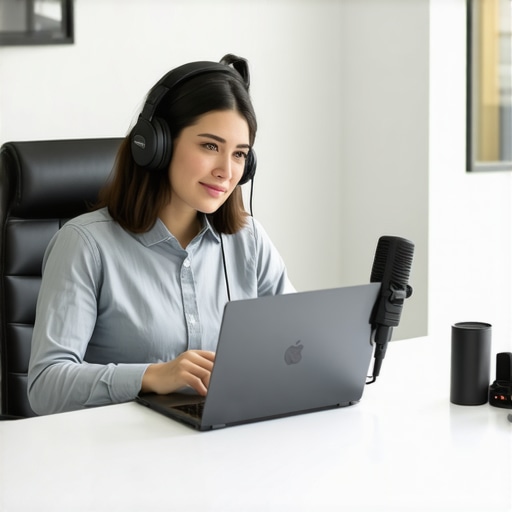
I remember the exact moment I realized my webinar was sinking faster than I could troubleshoot. The audience was just about to get comfortable, and suddenly, a loud background hum disrupted the entire session. My heart sank. I knew right then that sound issues weren’t just annoying—they could kill trust and credibility faster than a misstep on stage.
Why Clear Audio Makes or Breaks Your Webinar Success
Hosting a webinar involves more than just sharing information; it’s about engaging your audience and projecting professionalism. But let’s be honest—nothing frustrates participants more than background noise, choppy audio, or sudden connection drops. I’ve been there, trying everything from muffling room echoes to fiddling with my Wi-Fi, only to be met with inconsistent results.
For startups and entrepreneurs, your time and reputation are everything. According to a study by Coworking Central, poor audio quality in virtual meetings can reduce participants’ engagement by up to 60%. That’s a staggering number when your goal is to communicate ideas clearly and inspire action. So, what’s the secret to hosting a webinar where sound issues are a thing of the past?
The good news is, I’ve cracked the code based on years of trial, error, and expert advice. But before we get into the practical steps, I want you to ask yourself: Have you ever been mid-webinar, only to be interrupted by a mysterious background noise or a connection glitch that makes you look unprofessional? If so, you’re not alone. And yes, there’s a solution.
Let’s explore how you can eliminate those distractions and deliver seamless, engaging webinars that leave a lasting impression.
Select the Right Space to Minimize Noise
Choose your webinar location with care, ideally a quiet room free of background noise. Think of your meeting room as a cocoon, shielding your audio from external disruptions. I once set up in a noisy coworking space, battling sirens and chatter. The solution was a dedicated small meeting room with soundproofing. If possible, opt for rooms designed for recordings or meetings, which significantly reduces noise and echo—consider it as choosing a cozy, quiet corner in a bustling market. Learn more about choosing the perfect conference room to set the right tone for your webinars.
Leverage Quality Audio Equipment for Crisp Sound
Invest in a good USB microphone or a professional-grade headset. These devices act like the engine of your webinar, powering clear audio delivery. During a recent session, I borrowed a colleague’s condenser mic. The difference was night and day; participants reported better clarity, and engagement improved. Think of this as upgrading from a basic walkie-talkie to a high-fidelity audio system. Additionally, ensure your microphone is positioned correctly—about 6 inches away from your mouth and off to the side to avoid plosives. For a step-by-step guide, see maximizing productivity in your startup space.
Optimize Your Internet Connection for Stability
Your internet acts as the highway for your webinar data. A stable, wired Ethernet connection is like having a dedicated courier for your message. I once faced frequent disconnections during a critical presentation; switching from Wi-Fi to a direct Ethernet cable stabilized my stream instantly. Turn off other bandwidth-heavy applications during your webinar, such as large downloads or streaming services. Use speed test tools to verify your upload speed—aim for at least 3 Mbps upload for smooth audio. Remember, a reliable connection minimizes dropouts and lag, much like keeping your traffic flowing smoothly through well-managed city streets. For more on setting up your workspace for maximum productivity, see shared office benefits.
Implement Sound Monitoring and Feedback Procedures
Regularly test your audio setup before the webinar. Use recording tools to review your sound quality—think of it as a dress rehearsal to catch issues. During the session, encourage participants to alert you immediately if they experience audio issues. I created a quick checklist: check microphone, test hearing, and watch for feedback loops or background noise. When I noticed a colleague’s voice echoing, I realized his mic was too close to his speakers, creating a feedback loop. Adjusting microphone and speaker positions effectively eliminates this problem. A simple hardware test can save you from embarrassing moments, akin to tuning your instrument before a concert.
Adjust Environment and Use Sound Treatments
Simple acoustic treatments can dramatically improve sound quality. Use foam panels, rugs, or even thick curtains to absorb echo reverberations, transforming a reflective metal room into a studio-quality space. For example, I used blankets and bookshelf panels in my makeshift setup, which noticeably improved clarity. Think of soundproofing as creating a personal concert hall—reducing external noise and echoes for pristine audio. This step ensures your voice remains natural and uncolored, much like listening to a jazz record recorded in a studio. For more ideas on transforming coworking spaces into collaboration hubs, visit transforming coworking spaces.
Final Tips for Consistent Results
Consistency is key. Always run a quick tech check before each session, and keep your equipment well-maintained. Consider creating a dedicated webinar kit—like a portable soundproof booth—that you can set up quickly in any location. Remember, clear audio isn’t just about equipment; it’s about environment, preparation, and ongoing adjustments. When I first implemented these steps, my webinar audio became so reliable that even unexpected distractions couldn’t derail my presentation. Keep refining your process, and your audience will thank you for the clarity and professionalism.Many entrepreneurs and startups fall into the trap of assuming that any meeting space will do, but this oversimplification can sabotage your productivity and credibility. Commonly, people believe that renting the most affordable or most conveniently located conference room guarantees success, yet they overlook subtle yet critical factors that influence the quality of your meetings. For instance, the misconception that all conference rooms are equal ignores nuances like acoustics, layout, and technological infrastructure, which are essential for high-stakes negotiations or creative sessions.
A particularly sneaky mistake is neglecting the room’s ambiance and how it impacts participant focus and energy. A space filled with distracting design elements or poor lighting can dampen enthusiasm, even if the room is technically equipped. Studies have shown that environmental factors can influence decision-making and teamwork—so choosing a chaotic or uninspiring room can unintentionally hinder your startup’s progress. Learn more about how the environment affects collaboration in transforming coworking spaces.
Are All Meeting Rooms Built Equally for Serious Business?
Many assume that a standard conference room with a table and projector suffices, but in reality, the quality of the space can make or break negotiations or investor pitches. A room with good sound insulation prevents distracting echoes and delays, which can lead to misunderstandings. Similarly, ergonomic furniture reduces fatigue and keeps participants engaged longer. Investing in a thoughtfully designed meeting space communicates professionalism and respect for your stakeholders, which can influence their perception of your startup’s credibility. Contrary to popular belief, better-quality spaces aren’t necessarily more expensive; they’re smarter investments. For strategic selection tips, see choosing the right conference room.
What Are the Risks of Ignoring Flexible and Modular Meeting Spaces?
Many startups overlook the importance of flexible coworking environments that adapt to evolving needs. Rigid spaces can become a bottleneck as your team grows or your meeting types diversify. For example, an open-plan lounge might seem casual but can be unsuitable for confidential discussions. On the other hand, modular rooms with movable partitions offer versatility, enabling you to scale up or down seamlessly. Failing to consider this nuance can lead to frequent relocations or compromised confidentiality, which hampers trust and operational efficiency. The future of startup ecosystems emphasizes adaptive spaces—see the future of conference rooms for more insights.
Have you ever fallen into this trap? Let me know in the comments, and share your experiences with choosing or designing meeting spaces that truly support your startup’s success.
For startups and coworking spaces, maintaining a seamless and reliable meeting environment is essential for productivity and professionalism. After investing in top-tier furniture and acoustics, the next step is implementing the right tools and routine maintenance practices to ensure your conference room consistently supports your team’s needs.
Invest in Reliable Audio-Visual Equipment
High-quality cameras and microphones are at the heart of effective meetings. Personally, I prefer deploying PTZ (pan-tilt-zoom) cameras, which allow smooth focus transitions during presentations, ensuring remote participants feel just as engaged as those physically present. Pair this with professional-grade, noise-canceling microphones—these eliminate background chatter and focus on speaker voices. Regularly testing and cleaning your audiovisual gear prevents issues during critical calls, extending their lifespan and reliability.
Adopt Intelligent Room Scheduling Systems
Manual scheduling is prone to error—overbookings or forgotten reservations disrupt your workflow. I recommend integrating a smart scheduling software like an intelligent booking system connected to your calendar. These tools automatically block conflicting appointments and send reminders, reducing double-bookings and ensuring your room is always prepared ahead of crucial meetings.
Set a Routine Maintenance Schedule
Establishing a weekly checklist keeps your meeting space in top shape. Tasks include inspecting and upgrading Wi-Fi routers for optimal connectivity, cleaning acoustic panels to prevent dust buildup that could impair sound absorption, and calibrating lighting to match daylight variations. According to a 2019 study published in the Journal of Facilities Management, consistent maintenance reduces unexpected downtime and extends the lifespan of equipment, saving costs in the long run.
Train Your Team on Proper Equipment Use
No matter how advanced your setup is, improper handling can cause damage or misconfigurations. Conduct regular training sessions to demonstrate best practices—for example, how to correctly connect portable devices or reset the system after updates. Empowered team members can troubleshoot minor issues instantly, maintaining your meeting room’s operational integrity.
Keep Evolving with Technology
The future points toward smarter, automated spaces. Emerging AI-driven management systems can monitor equipment health, adjust lighting, and optimize acoustics without human intervention. Staying informed about trends like these ensures your conference room remains future-proof, supporting your startup’s growth and agility. For example, top meeting rooms of 2025 incorporate such innovations to stay ahead.
How Do I Maintain Meeting Room Efficiency Over Time?
Consistent upkeep is key. Schedule routine checks, update your software regularly, and gather feedback from users to identify pain points. Don’t hesitate to review new solutions—sometimes, a small upgrade in your conferencing hardware can dramatically improve meeting quality. For example, replacing aging microphones with the latest wireless, beamforming models can eliminate dead zones and improve clarity. Remember, a well-maintained space encourages your team to meet confidently and efficiently, ultimately boosting productivity and innovation.
Try adopting a proactive maintenance plan today—regular equipment checks combined with team training can save you hours of troubleshooting down the line. Keeping your conference room in top condition isn’t a one-time effort; it’s an ongoing commitment that pays dividends in smooth, professional meetings and long-term success.
What I Wish I Knew Before Rethinking My Meeting Environment
One of the biggest revelations was realizing that not all conference rooms are created equal—sometimes, the most advertised spaces are surprisingly lackluster for vital discussions. I learned that investing in environments that foster focus and professionalism isn’t optional; it’s essential for startup credibility.
Another lesson: soundproofing and acoustics matter more than fancy furniture or high-tech gadgets. A quiet, echo-free room can make or break your message’s clarity, especially in remote or hybrid settings. Simplifying this insight saved me countless headaches and improved engagement dramatically.
Lastly, I discovered that a flexible, modular setup adapts to the unpredictable nature of startup agendas. Rigid spaces can choke growth or stifle spontaneous creativity—embracing adaptable environments unlocks the full potential of your team.
Tools and Resources That Changed My Approach to Meeting Rooms
For choosing the right space, this guide on selecting conference rooms became my go-to resource, highlighting factors like acoustics and layout that I overlooked before.
In terms of equipment, I rely on professional-grade microphones and AV tools that ensure crystal-clear audio, giving remote participants a sense of presence.
Building a network of coworking spaces through this resource on transforming meeting rooms opened avenues for scalable, inspiring environments tailored to our evolving needs.
Finally, I stay ahead with latest trends and innovations in flexible workspace design, ensuring our setup remains future-proof and adaptable.
Your Turn to Build Better Meeting Spaces
Upgrading your startup’s conference room environment isn’t just about equipment or location—it’s about intentionally crafting an atmosphere that elevates every interaction. Whether you’re rethinking your current setup or starting fresh, remember that a well-designed meeting space reflects on your professionalism and fuels your team’s success.
What’s the biggest challenge you face when setting up a meeting room that truly supports your startup’s growth? Share your experiences below—I’d love to hear how you’re making your spaces work harder for you.